Best Buy Credit Card Bill Payments: 5 Ways to Pay Your Bill
You can make a Best Buy credit card bill payment online, by phone, by text, in a Best Buy store or by mail. Online is the fastest. Citibank, N.A. issues the card and manages the account, so your payment goes to Citi, not to Best Buy.
This guide uses current terms from Best Buy and Citi, checked on November 12, 2026. Pay only through official pages. This site is not Best Buy or Citi, and it never takes payments.
What are the ways to pay?
| Method | Where | Before you start |
|---|---|---|
| Online | Citibank Account Online, or Pay now on Best Buy’s card page | Register your card first |
| Phone | 1-888-574-1301 | Have your account number and bank details ready |
| Text | Text PAY to 81964 | Save a payment account in Account Online first |
| In store | Any Best Buy store | Ask a Blue Shirt |
| Address on your statement | Mail early |
How do you pay online?
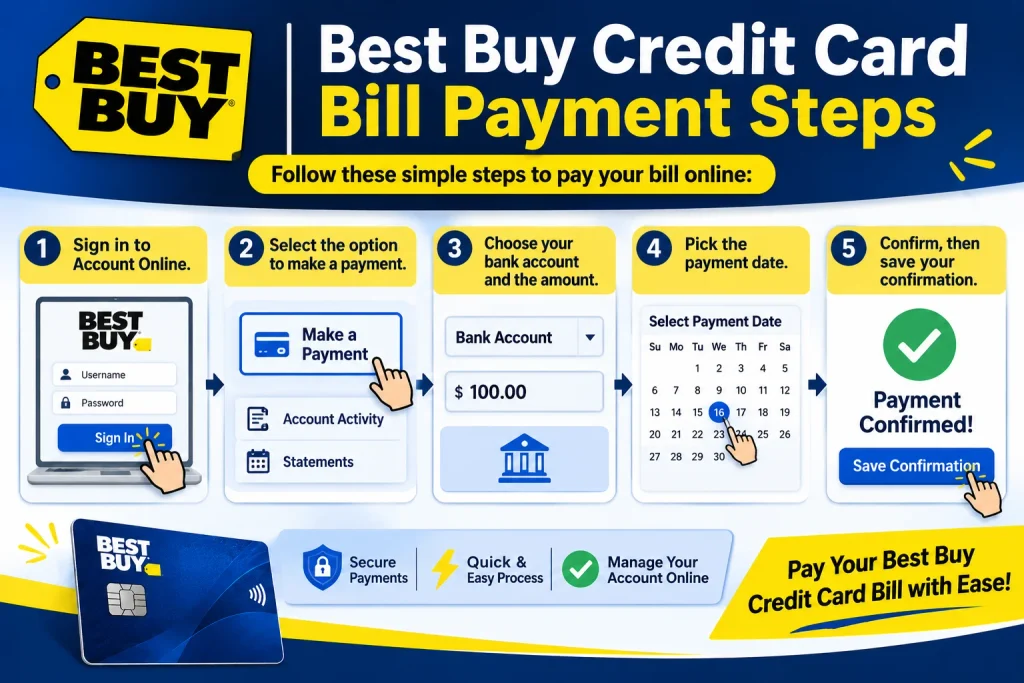
Use Citibank Account Online. Open the Citibank Account Online sign in page. You can also select Pay now on Best Buy credit card page. That button starts at Best Buy’s sign in and then takes you to Citi. Best Buy says clicking it means you agree to Citibank’s terms and privacy policy.
- Sign in to Account Online.
- Select the option to make a payment.
- Choose your bank account and the amount.
- Pick the payment date.
- Confirm, then save your confirmation.
New cardholders must register before they can pay online.
Can you pay by phone, and what is the number?
Yes. Call 1-888-574-1301 and use Citi’s automated payment system. Have your account number and a check from a U.S. bank ready. Best Buy says the automated system charges no fee. TTY users can dial 711. The same number handles account and billing questions.
How do you pay by text?
Text PAY to 81964 from the mobile device linked to your account. Best Buy says your payment account must be saved in Account Online first. Set that up before your due date. Debit card payments do not work by text. Message and data rates may apply.
Can you pay in a Best Buy store?
Yes. A Blue Shirt can help you process your payment. Use the store locator to find the closest store. Keep your receipt.
Where do you mail your payment?
Send your check or money order to the address printed on your statement. Best Buy’s card page gives that instruction and lists no address of its own.
Do not copy an address from a search result. Third party sites list different P.O. boxes in Philadelphia, Louisville and Phoenix. GOBankingRates says the right one can depend on your card type.
WalletHub advises sending a check or money order, never cash. Write your account number on it. Mail early, because a payment that reaches Citi after the due date counts as late. For next day delivery, ask Citi for the correct overnight address first.
Can you make a one time payment without logging in?
Yes. Citi runs a guest pay page for this card. It is meant for payments without signing in. Check what details it asks for, and enter them only on that official page.
Phone and in store payments also work without Account Online.
Is there an app for payments?
Best Buy’s card page promotes the Best Buy app for your Wallet, bonus offers and rewards progress. It does not list bill payment as an app feature. Pay through Account Online, by phone, by text, in store or by mail.
How much should you pay each month?
Your statement shows the minimum payment due and the due date. Account Online shows the same details. The minimum keeps your account current, but it rarely clears a financing plan. The CFPB says the minimum alone usually will not pay off a deferred interest purchase in time.
Best Buy lists store card purchase APRs from 27.99% to 30.99% variable. A balance you carry costs a lot. Pay the full statement balance when you can.
How do you pay off a financing plan on time?
Divide the price by the number of plan months. Round up. A $1,200 TV on a 12 month plan needs $100 a month.
- Find your plan end date on the front of your bill. It can differ from your monthly due date, says the CFPB.
- Plan to finish early. A late final payment brings back interest from the purchase date.
- Watch where extra money goes. If you also carry regular purchases at a higher rate, federal rules send extra payments there first.
- In the last two billing cycles of the plan, extra money must go to the plan balance first. Before that, you can ask Citi to apply it there. Call 1-888-574-1301.
Regulation Z, section 1026.53 covers this rule.
What is the payment cutoff time?
Best Buy’s card page and help page list no cutoff time. Check the confirmation screen in Account Online for the posting date. Pay a few days before your due date. If you must pay on the due date, use online or phone and save the confirmation.
What happens if you pay late?
A late payment can bring a late fee. Check your cardholder agreement for the amount. The CFPB says you could lose a deferred interest period if you are more than 60 days late.
If you know you will miss a due date, call Citi at 1-888-574-1301 before it passes. Ask about your options.
Is paying the Visa different from the store card?
Best Buy lists the same ways to pay for both cards. Both use Citibank Account Online. Mailing addresses may differ by card type, so rely on your statement.
How do you avoid payment scams?
Pay only through Best Buy credit card login and Citi pages. Citi hosts its pages at citiretailservices.citibankonline.com. Text PAY only to 81964, and only from the phone linked to your account. Never share your full card number, password or one time code with a guide site, including this one. Never pay a caller with gift cards or wire transfers.